
Screenshots
About Emoji Lock Screen
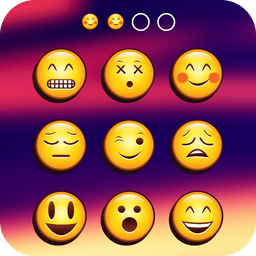
Transform your phone's security with Emoji Lock Screen, the fun and stylish way to protect your device while expressing your personality. This innovative lock screen app combines emoji-based PIN protection with stunning visual customization, letting you create a truly unique unlock experience that's both secure and entertaining.
Take full control of your device's appearance and security. Set emoji as your PIN password or choose from multiple unlock methods including pattern locks and traditional passcodes. Whether you prefer a four-digit code or an interactive pattern, you'll enjoy peace of mind knowing your personal data stays protected behind your chosen barrier. The app supports both phone and tablet devices, adapting seamlessly to any screen size.
Express yourself through endless customization options. Select from dozens of beautiful themes including square, fruits, glass, flowers, and more—change your lock screen design daily to match your mood. Upload couple photos, family pictures, or your favorite memories directly onto your lock screen, or decorate individual keypad buttons with personalized images. Customize the color, size, and style of your date and time display, and add sliding unlock text with your name, favorite quotes, or love messages.
Enjoy a rich collection of wallpapers both offline and online, ensuring you always have fresh visual options at your fingertips. The material design aesthetic keeps the interface clean, intuitive, and beautiful—perfect for emoji lovers who want their lock screen to be as stylish as it is functional. With PIP-style theme options and extensive personalization features, your lock screen becomes a true reflection of who you are.
Performance matters, which is why Emoji Lock Screen is optimized to consume minimal memory and battery power. The lightweight design doesn't slow down your device, so you get robust security without any compromise on speed or efficiency. From enhanced privacy protection to delightful visual customization, every feature serves both security and style.
Download Emoji Lock Screen today and discover how protecting your smartphone can be fun, personal, and effortlessly stylish. Remember to choose a PIN or pattern you'll easily remember when unlocking your phone.
Pros & Cons
Pros
- Multiple unlock methods including emoji PIN, pattern, and passcode options
- Extensive customization including themes, wallpapers, and personal photo uploads
- Lightweight design optimized for minimal memory and battery consumption
- Supports both phones and tablets with adaptive screen sizing
Cons
- Replaces your system lock screen, which may conflict with device security policies
- Custom unlock methods require you to remember your chosen PIN or pattern
- Online wallpaper access depends on internet connectivity for fresh content
- Personal photo uploads stored locally could affect device storage over time
Related Apps

AlienGUIse
Desktop themes and manager for Windows — transform your system with 5 futuristic designs.

SharpKeys
Remap keyboard keys to launch apps, media controls, and custom commands on Windows.

RocketDock
Desktop launcher for Windows — quick access dock with customizable icons and positioning.

Custom Resolution Utility (CRU)
Display resolution utility: Create custom resolutions for your monitor with precise refresh rate control.

Lagguy Wallpapers
Lagguy
4K & HD wallpapers for Android — minimal, abstract, nature, AMOLED designs with lifetime access

Lock Screen OS
Apps Genz
Customize your lock screen with widgets, photos, and notifications. Replace Android's default lock screen.
Latest Articles

Best AI admin task automation apps for desktop in 2026 (we tested 7)
Jul 11, 2026

Best AI coding tutor apps for desktop in 2026 (we tested 7)
Jul 11, 2026

Best apps for the *arr media stack on desktop in 2026 (we tested 7)
Jul 11, 2026

Best classic Doom source port apps for desktop in 2026 (we tested 7)
Jul 11, 2026

Best FFXIV companion apps for desktop in 2026 (we tested 7)
Jul 11, 2026